TikTok’s interface has a lot going on, but every element earns its real estate.
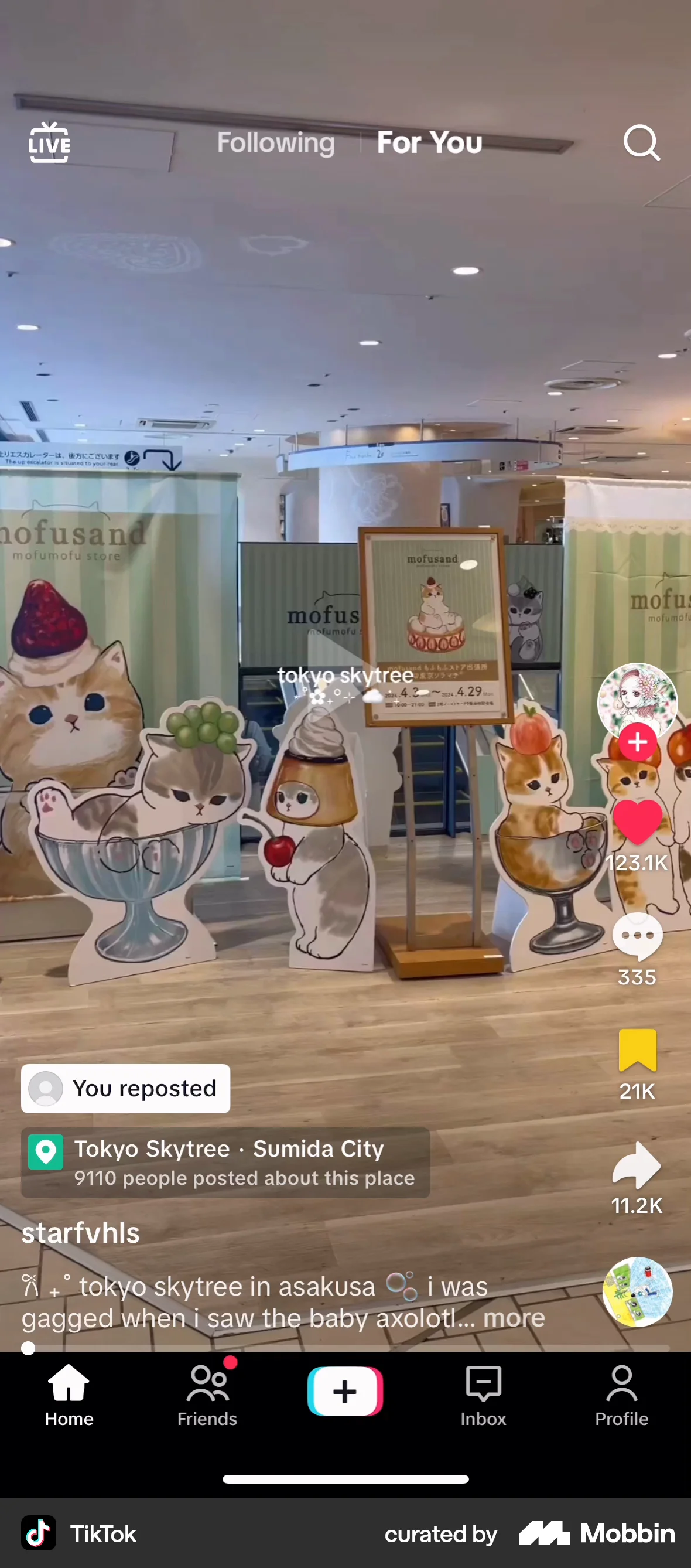
The bottom and top navigation bars
Navigation should always be visible in the app. The obvious reason is that people might want to do other things besides watching videos. Making nav less visible or requiring extra taps means fewer of those activities, which hurts overall engagement. Navigation being less visible and accessible also causes confusion.
The right-side buttons
The right-side buttons (like, comment, share, bookmark), besides their utility, also act as social proof. The numbers give you info to decide whether to keep watching or swipe next, so you waste less time on content you end up regretting.
And they provide signals for the algorithm too. Making them visible means people are more likely to give feedback to the videos they watched.
The comment count tells you “there’s a conversation happening and you’re not in it yet”. Visible button/count → curiosity → open comments → read → maybe reply → more time on the platform and more content for other users to consume (comments are generally fun to read).
The button at the bottom is the music credit. Showing credit motivates producers to make music for the platform.
The caption & username
Creator use captions for self-expression, and sometimes promotion. The username lets creators build recognition. The presence of captions & usernames adds a social layer, making viewers feel “there are people here too, not merely content”.
The UI matches the user’s investment level
This clutter doesn’t feel bad because users aren’t in the high-attention mode. They’re just “surfing”. You’re not watching a movie on a big screen where any overlay is a distraction. You’re scrolling for dopamine, and in this context, the bar for what is distracting is way higher.
TikTok does have Clear Mode (long-press → tap the button, or use two finger to “pinch out”). But it’s hidden so most users will never discover (you can search “clear mode tiktok” and see how many people say “wow thanks for the info!”). The default is the busy screen, which almost always fits the user’s state of mind.